A team of AI employees, on the Claude you already pay for.
Employeflow turns Claude into a working team for your business. Each AI employee owns one area, from the inbox to your invoices to your marketing, and delivers finished work for you to review.
Nothing reaches a customer without your approval unless you let an employee do more, and it all runs on your company’s own Claude plan. Free to start · no card, nothing to cancel.
For owners who already use Claude
A team of AI employees, on the Claude you already pay for.
Employeflow turns Claude into a working team for your business. Each AI employee owns one area, from the inbox to your invoices to your marketing, and delivers finished work for you to review. Nothing reaches a customer without your approval unless you let an employee do more, and it all runs on your company’s own Claude plan.
Free to start · runs on your own Claude plan · no card, nothing to cancel
This is the portal. Your team at their desks, live. Scroll to zoom, click a person.
HOW A TASK GETS DONE
1
You write the task in your portal
Your portalTasks
Sam: answer this morning’s emails
One sentence, the way you would tell a person.
↓
2
Sam does it in your Claude app
NameRoleSkills · job
Sam
Inbox assistant
4 skills·on your own Claude
On your computer, on your company’s own Claude plan.
↓
3
It comes back to you first
ready for you9 reply drafts
You read them, then you decide what goes out.
The problem
So much in Claude Code. So much organising.
You open new sessions, re-explain the context, figure out which skills to use and babysit prompts. New sessions often start from scratch, and out of the box they don’t talk to each other, so it all feels unorganised.
New sessionRe-explain the contextWhich skill was it?Babysit the promptCopy, paste, repeat
Employeflow organises it into one team.
The solution
Say what you want. Your team does the rest.
One Boss, and specialists who each own one job. They talk to each other and hand work over, inside Claude Code.
Claude CodeIllustration · Example team · Studio North
The Boss~/Employeflow/Studio North/Boss
>Answer Sarah Lane and send her a quote for the kitchen.
hand_outIvyLeo
Ivy sorts Sarah’s email
Leo drafts the reply
hand_offLeo → Ben
Ben builds the quote from your price list
2 employees working…
Specialists
Each employee is a specialist with its own skills, tools and folder. It keeps its own notes, so you don’t have to explain the same things every time.
L
LeoLead follow-up
Skills
lead-follow-up
Tools
GmailGoogle Calendar (optional)
Folder
~/Employeflow/Studio North/Leo
Notes
leads.md · every lead and where it stands
How they communicate
Hand-offs move work from one session to the next. Team Chat shows who got what done, and what needs you waits in one place.
Done todayYour portal · Needs you + Team Chat
Waiting for you2
LLeo: reply to Sarah Lanewaits for you
BBen: quote for Sarah Lanewaits for you
IIvy: done · 35 emails sorteddone
RRemy: done · 4 receipts fileddone
Studio North is an example team; names and work are examples.
Ready-made employees
Hire employees who already know the job.
Each one comes with its job and its limits built in. Free includes one, every paid plan all twelve.
Ads Manager
Manages your Facebook and Instagram ads and reports what works.
Stays with you: every launch, pause and budget change, inside your limit.
Customer Service
Answers customer emails in your tone.
Stays with you: every reply, complaint and refund.
Office
Quotes, invoices, reminders, receipts for your tax advisor.
Stays with you: everything a customer gets. No bookkeeping, no tax advice.
Email Marketing
Writes your newsletter as a draft in your newsletter tool.
Stays with you: pressing send. Only people who agreed get mail.
SEO and Website
Review replies, better page titles, useful new pages.
Stays with you: every change to your site or profile.
Social Media Manager
Plans and writes your posts and comment replies.
Stays with you: every post and every reply. You post them yourself.
Office Coordinator
Tracks what’s overdue and writes meeting to-dos.
Stays with you: every invite and every date.
Reception and Bookings
Answers booking requests with two free slots.
Stays with you: every booking and every message. Not yet for medical, therapy, legal or tax practices.
CRM and Data
Finds duplicates, stale deals and missing consent.
Stays with you: every merge, deletion and bulk change.
Lead follow-up
Answers new inquiries, follows up once or twice.
Stays with you: every email. Only to people who wrote first.
Inbox sorter
Sorts new emails into five piles every morning.
Stays with you: every answer. It never sends or deletes.
Receipts to your accountant
Files receipts daily, prepares the monthly email.
Stays with you: that email. It never pays, books or deletes.
Coming: Google Reviews. Practices bound by professional secrecy can use SEO, Social Media and Ads for now.
How it works
Set it up once. Then just hand out work.
About five minutes to set up. After that, a task is one sentence.
STEP 1
Create your free account, connect your Claude
Sign up free, no card. Add the plugin in the Claude app, sign in once with /mcp, then type /employeflow:start.
STEP 2
Give each employee a job
Inbox, quotes, posts: each gets the skills for its job and keeps its own notes.
STEP 3
Hand out work, decide what goes out
One sentence per task. The result lands in your portal. By default it asks you before anything is sent.
Before and after
What changes when your sessions work as a team.
Real kinds of Claude Code work. The numbers are sourced; the rest is how it runs.
Build a feature
BeforeOne chat. You copy and paste between the plan, the code and the review.
With EmployeflowPlanner, builder and checker, each its own session. The plan goes to the builder, the build to the checker, without copy and paste.
Code work needs “programs” switched on for the team (Skills → What your team may reach).
Research into content
BeforeYou research in one chat, then rewrite it as posts in another.
With EmployeflowResearch hands its brief to the writer. The drafts wait in one place for your yes.
The morning inbox
Before53 business emails a day, sorted by hand. Bitkom 2026
With EmployeflowAt 8:00 the inbox sorter sorts them into five piles and tells you what needs you.
With EmployeflowReceipts filed every evening. At month-end, the email to your accountant waits for your yes.
Rounds run while your computer is on and the Claude app is open.
Who it’s for
◎
Owners running lean
You already do six jobs. Hand four of them to employees.
▣
Agencies with client work
One portal per client: its own employees, skills and audit trail.
⋮
Teams already using Claude Code
You pay for Claude and use it every day. This turns it into a team.
Before you start
Straight answers
Does it replace my Claude plan?
No. Your employees run in the Claude app on your company’s own Claude plan. We charge for the portal, never for the AI.
What does Employeflow see?
The tasks you write and what your employees send back, plus model, tokens and time per turn. Your prompts, files and other chats stay on your computer.
Will it send anything on its own?
Not unless you let it. By default it asks you before anything is sent. You can let an employee do more, step by step; paying and deleting always ask you.
Is it finished?
Not yet. Some parts are still thin, and we tell you which ones.
Pricing
You pay for the team, not for the AI.
Start free. You pay us for the team and the portal; the AI runs on your own Claude plan (Pro or Max if you work alone, Team or Enterprise if more people use it) or your own Anthropic API key, billed by Anthropic directly. No plan counts your tasks.
For businesses and the self-employed only. All prices plus VAT.
Free
€0 · no end date
1 team: your Boss and 3 employees, 1 ready-made employee. Only you can sign in.
Starter
€25 /mo + VAT
3 teams, as many employees as you like, all ready-made employees. 2 people can sign in.
Growth · recommended
€50 /mo + VAT
Everything in Starter, 5 teams, 5 people can sign in.
Scale
€100 /mo + VAT
Everything in Growth, 20 teams, 20 people can sign in, priority help.
Launch price: upgrade before 31 January 2027 and keep this price for as long as your plan runs without a break. Changes in VAT aside.
Your first team is ready in a few minutes.
Create your team, add the plugin in the Claude app, hand out the first task. Free to start, no card.
How it works
Set it up once. Then just hand out work.
About five minutes of setup, once. Then follow one employee, Rosa, from her
first task to the newsletter on your desk.
01 · CONNECT
Create your free account, connect your Claude
Create your free account first: free to start, no card. Then, in the Claude app, open Settings → Plugins, click Add, paste employeflow/plugins and click
Add to this computer. Connect once: in a new Code session type /mcp, choose employeflow and click Authenticate,
sign in with your Employeflow account (Google works) and click Allow. Then type /employeflow:start and pick your
team lead. No code to copy. Each employee gets their own session, named after them and filed under your team in the
sidebar. Say yes when it asks, and it checks for new work every 15 minutes while the app is open, for up to 7 days (type /employeflow:work in that session to restart it).
It works on your company’s Claude plan, while that computer is on.
02 · ASSIGN
Give each employee a job
In your portal, add Rosa · Posts & newsletter.
She gets the skills for that job and keeps her own notes, so next week she still knows your
tone, your topics and what you liked last time.
03 · APPROVE
Hand out work, decide what goes out
Write “Rosa: this week’s newsletter”. Your Claude app picks it up,
Rosa writes it, and the draft lands in your portal with the date. Employeflow never sends
anything on its own: you read it and decide.
The whole thing, as one machine
A task goes in. Finished work comes out. You sit in the middle.
Press the button and watch one task travel. It always stops at your light.
Nothing moving yet.
24
Screens in the portal you get
COUNTED IN THE BUILD · 16 OCT
A chatbot
Starts from zero.
Every conversation begins with nothing. You explain your business again, paste the same
context again, and when you close the tab it is gone.
An employee here
Knows where it works.
A role, the skills for it and its own notes on your business. It picks up the next task
without a briefing, and what it learned yesterday is still there today.
A chatbot
Can cost you anything.
There is no ceiling and no line item. You find out what it cost when the bill arrives.
An employee here
Only works on what it was given.
A team does the tasks you wrote, and the Boss hands out at most five parts of a task. Nothing
starts on its own. Your plan never counts tasks: the work runs on your own Claude plan.
A chatbot
Tells you what it would do.
Then you copy it out, paste it somewhere else, and do the actual work yourself.
An employee here
Does it, and hands you the file.
Finished work with a name and a date, saved on your computer and listed in your portal.
Anything meant for a customer comes to you first.
A chatbot
Leaves no trace.
If someone asks who approved that email, there is no answer.
An employee here
Writes everything down.
Every task, who did it, what came back and when. You can always answer
“who did this, and on whose word?”
Your yes first
Nothing leaves without you.
Employeflow never sends anything on its own. Your employees write the email, the
post or the reminder and hand it to you. You read it, and you decide whether it goes out.
WHAT THE EMPLOYEE DID
Wrote the update to eight
members about this month’s changes, in your tone, and put it in your portal.
Then stopped.
writtenready for you
WHAT YOU DO
Read the exact text, change a
word if you like, and send it yourself, or don’t. Every result stays in your portal with
its date, so you can always see what was done and when.
your call
Who this is for
Built for people who answer for their business.
◎
Owners running lean
You already do six jobs. Hand four of them to employees who do the
work and never send anything you have not read.
▣
Agencies with client work
One portal per client. Separate employees, separate skills,
separate audit trail. Nothing crosses between them.
⋮
Teams already using Claude
You pay for Claude and use it every day. This turns it into a team:
each employee with one job, its own tasks, and you checking the work.
Straight answers
What this is not.
It is not a model, and it does not replace your Claude subscription
Your employees run in the Claude app, on your company’s own Claude plan. We charge for the portal, never for the AI
It does not read your conversations
The portal gets the tasks you write and what your employees send back: results, drafts for your yes, chat replies. After each turn it also gets the numbers: model, tokens and time. Your prompts, other files and other chats stay on your computer
It will not send anything on its own
Everyone starts at Shows you first: everything waits for your yes. You can let an employee do more, step by step; paying and deleting always ask you.
It is not finished
Parts of it are still thin. We tell you which ones rather than dressing them up
What is in the box
Twenty-four screens, not three.
Skills
What they can do for you.
Five jobs come ready with the plugin. Give one to any employee as a task, and the result comes
back to your portal. They use your own Gmail, Drive and Calendar when you have turned them on in your Claude;
we never get access to those accounts.
Comes with the plugin
Inbox replies
Reads your new emails and writes a reply to each one that needs an answer. Only a reply you approve becomes a Gmail draft,
with exactly the text you approved; a declined one never reaches Gmail. Nothing is sent: you press Send in Gmail.
“Answer today’s customer emails.”
NeedsGmail turned on in your Claude
Neversends, deletes or archives a mail
Comes with the plugin
Invoices
Collects the month’s invoices from Gmail and Google Drive into one table by category,
with totals, and flags what looks unusual: a duplicate, a new supplier, an overdue date.
“Sort the October invoices.”
NeedsGmail or Google Drive, or the invoices pasted into the task
Neverpays, approves or answers a supplier
Comes with the plugin
Social posts
Writes three posts for the week in your company’s tone, from your goals and notes, each
with a suggested day, hashtags and an idea for the picture.
“Write this week’s Instagram posts.”
Needsnothing extra
Neverposts, schedules or makes the images
Comes with the plugin
Meeting prep
One page per meeting: who comes, what it is about, what happened last time, and three
questions for you, from your calendar and the related emails and files.
“Brief me for tomorrow’s meetings.”
NeedsGoogle Calendar, or the meeting named in the task
Neverchanges your calendar or contacts anyone
Comes with the plugin
Weekly report
Your team’s week on one page: what each employee finished, what is still open, and what
needs you, such as drafts waiting to be sent or flagged invoices.
“Boss: the Friday report.”
Needsnothing extra; best given to your team lead
Neverhands out work by itself
Research
Competitor checks, market numbers, background on a company, with the sources attached.
Written as a task.
Documents & reports
Writes the thing you keep putting off and hands you the finished file,
named and dated. Written as a task.
Spreadsheets & data
Cleans lists, removes duplicates, reconciles numbers, and tells you
what it changed. Written as a task.
After the first day
What the second week looks like.
The three steps above you do once. This is what using it feels like
after that.
One sentence is a task
You hand it out the way you would to a person.
“Draft the weekly update.” “Clean up the lead list and tell me what you
changed.” If you turn it on when you start an employee, their session checks for new tasks every 15 minutes while the app is open, for up to 7 days
(type /employeflow:work in that session to restart it), so work gets picked up without you starting anything. A check that finds nothing new stops before Claude starts, so it uses none of your plan.
Bigger jobs, through the Boss
Give the Boss the whole job.
He splits it into up to five parts, each a real task for the right employee, and each result
comes back to you. When one employee needs something from another, they ask through your portal,
and you see it in Team Chat.
On the phone, because it is a browser
The part you do away from the desk is deciding.
It takes seconds: read the exact words, approve or decline. That works on the device in
your pocket, which is where most of them will actually happen — in a queue, between
meetings, at the end of the day.
When something goes quiet
You can see who is working.
Your portal shows for each employee whether their session checked in, and when, and what they are
working on now. A computer that went quiet does not hide.
See what it costs.
Pricing
You pay for the team, not for the AI.
Start free, grow when your team does. The AI runs on your own Claude plan: Pro or Max if you work alone, Team or Enterprise if more people use it, or your own Anthropic API key. Anthropic bills you for it directly, so no plan counts your tasks.
The plans differ by how many teams you run, which
ready-made employees you can hire and how many people can sign in. Billing is not switched on
yet, so nobody is charged anything. Every new account starts on Free: no card, and it stays free.
For businesses and the self-employed only. All prices plus VAT.
Free
€0 · no end date
No card
1 team: your Boss and 3 employees
1 ready-made employee
+ your Claude plan, billed by Anthropic (Pro or Max for one person, Team for more)
Only you can sign in
Starter
€25/mo + VAT
3 teams
As many employees as you like
All ready-made employees
+ your Claude plan, billed by Anthropic (Pro or Max for one person, Team for more)
2 people can sign in
Starter opens when billing does. Nobody is charged until then.
Growth · recommended
€50/mo + VAT
Everything in Starter
5 teams
5 people can sign in
Growth opens when billing does. Nobody is charged until then.
Scale
€100/mo + VAT
Everything in Growth
20 teams
20 people can sign in
Priority help
Scale opens when billing does. Nobody is charged until then.
Launch price: upgrade before 31 January 2027 and keep this price for as long as your plan runs without a break. Changes in VAT aside.
In total you pay two things: our plan, and your own Claude plan (Pro or Max if you work alone, Team or Enterprise if more people use it) or API key, billed by Anthropic. Nothing else: no plan counts tasks.
Upgrades open soon. Until then, write to support@employeflow.com: free until billing starts, and we tell you the price and ask before anything is charged.
ON YOUR OWN CLAUDE
Your employees work in the Claude app on your own
computer, on your own Claude plan (Pro or Max for one person, Team or Enterprise for more). We charge the plan price above and nothing
else, and the Free plan costs nothing. Your team only works on the tasks you give it, so your Claude plan is never used behind
your back.
More than 20 teams?
Write to support@employeflow.com and we set it up with you. The AI runs on your own Claude plan: Pro or Max if you work alone, Team or Enterprise if more people use it, or your own Anthropic API key. Prices exclude VAT.
Every plan includes
The same portal, whichever plan you pick.
The portal
Your whole team on one screen.
Every employee, what it is working on and what it handed back, in one place instead of a
row of chats.
On your phone
The same portal, in a browser, on the device in your pocket.
Read what is waiting, approve it, give someone the next job. Nothing to install there
either.
Skills
Give an employee what it needs and nothing more.
A library to hand out, a handbook the whole team reads, and skills only your team has
— written for your team and approved by you before anyone gets them.
Your yes first
Results come to you before they go anywhere.
You see the exact text of every email, post and reply. Employeflow never sends anything
on its own.
Work that picks itself up
Each employee can check for new work every 15 minutes.
You turn it on with one yes when you start that employee. It runs while the Claude app is open, for up to 7 days (type /employeflow:work in that session to restart it), and a check that finds nothing new is stopped before Claude starts.
Nothing starts on its own: every check only picks up tasks you wrote.
The record
Every action leaves a receipt.
Who decided, when, which employee, what came out.
Still deciding? Start on Free.
No card to enter and nothing to cancel. Connect the Claude app
you already use, give your Boss and three employees real work, and move up only when you want more.
Case studies
How people run Claude Code as a team.
One real story: how we build Employeflow with Employeflow. Five examples, each marked as an example, of what a team of sessions does.
Real · our own team
How we build Employeflow with Employeflow
Our company runs as one Employeflow team in Claude Code. Each role is its own session: lead, design, engineering, proof, documents and legal, research, numbers.
LeadDesignEngineeringProofLegalResearchNumbers
How it runsA page like this one: engineering builds it, a legal-check session reads every word, proof tests it, then the owner says “promote”. Finished steps land as receipts in our portal.
YouSays “promote”. Nothing ships before that.
Example
An indie developer ships an app
One sentence to the Boss: “Add a checkout to the app.” The plan, the build and the review each run in their own session.
BossPlannerBuilderReviewer
How it runsPlanner → builder → reviewer. The reviewer’s findings go back to the builder.
YouReads the review and merges.
Code work needs “programs” switched on for the team (Skills → What your team may reach).
Example
A creator’s content pipeline
Research finds what the audience asks. The writer turns it into posts and a newsletter in the creator’s voice.
BossResearchWriterEditor
How it runsResearch → writer → editor. The drafts wait in Needs You.
YouApproves the drafts and posts them.
Example
A first-time entrepreneur builds a first product
An entrepreneur with an idea and the Free plan: the Boss and three teammates.
BossPlannerBuilderChecker
How it runsThe planner breaks the idea into steps, the builder builds, the checker tests. Team Chat shows what each one did.
YouDecides the next step, and learns from every hand-off.
Example
An agency with one portal per client
Every client gets its own team: its own sessions, skills and audit trail. Nothing crosses between clients.
Client AClient BClient C
How it runsEach client’s Boss hands out that client’s work only.
YouChecks each client’s Needs You.
Example
A small business runs its admin rounds
Three positions do a round every day while the computer is on and the Claude app is open.
How it runsInbox sorted, lead replies drafted, receipts filed. Each done line lands in Team Chat.
YouSays yes to the replies and the month-end email.
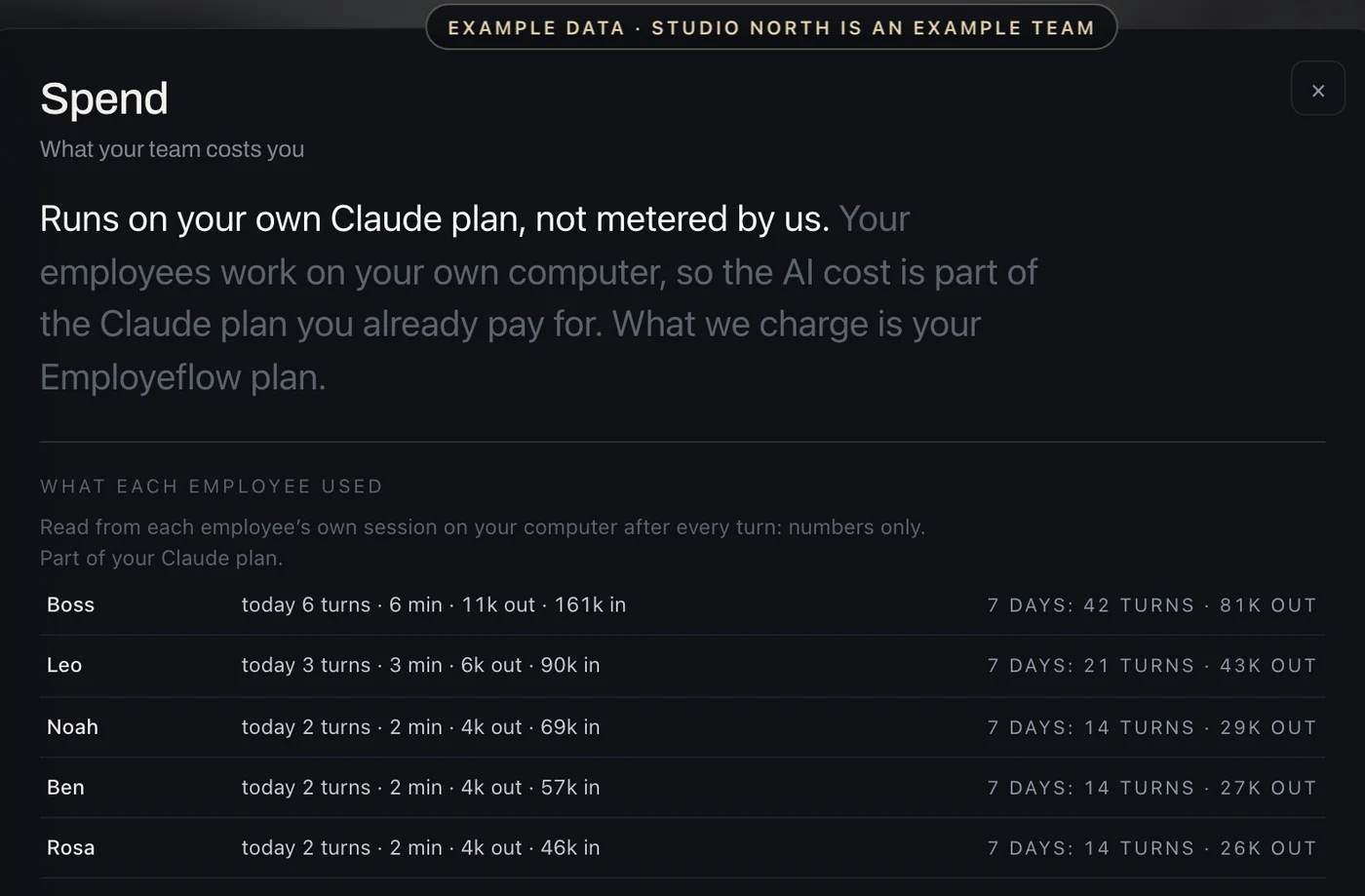
Tokens
What each session used
Model, tokens and time for every turn, read from each session on your computer. It all runs on your own Claude plan.
No customer quotes and no invented results: the examples show how a team of sessions runs, not what a customer achieved.
20 everyday jobs
Type one sentence. Get the work back.
Email & customers4
Answer the inbox
You type“Sort this morning’s emails and draft the replies. Anything about money comes to me.”
You get backA reply for each one, for your yes; only approved ones become Gmail drafts. Plus a short list of what needs you.
GmailDrafts only: you press send.
Answer the same customer questions
You type“Answer the questions about delivery and returns, using my FAQ.”
You get backAn answer for each mail, in your tone; the tricky ones come back to you with a note.
Gmail · your FAQ fileNo shop connection, so order status is yours to add.
Follow up after a call or an offer
You type“Write the follow-up to Müller GmbH from my call notes.”
You get backAn email draft with the next step and a date.
Your notes · GmailIt can’t hear the call: give it your notes or a transcript.
Prepare tomorrow’s meetings
You type“Brief me for tomorrow’s meetings.”
You get backOne page per meeting: who comes, what it is about, what happened last time, and three questions for you.
Google Calendar · Gmail · DriveReads only: it never changes your calendar or writes to anyone.
Office & data5
Clean up a messy customer list
You type“Clean up customers.xlsx: duplicates, spellings, empty rows.”
You get backA clean copy, a list of what changed, and the doubtful duplicates set aside for you.
Excel · CSVYou export the list and import the clean one yourself.
Invoices and PDFs into one sheet
You type“Put every invoice in the October folder into one table.”
You get backOne sheet with date, supplier, amount and VAT, plus a list of the files it couldn’t read.
PDFs in a folder · ExcelHandwriting and blurry scans are unreliable.
Meeting notes into tasks
You type“Turn these meeting notes into who does what by when, and draft the follow-up mail.”
You get backAn action list with names and dates, and the email to the team as a draft.
Your notes · GmailNo Zoom or Teams connection: you drop the notes in.
A one-page report
You type“Make a one-page report from these three sheets: cash, sales, what’s late.”
You get backOne page with the numbers and where each one came from.
Excel · CSVOnly as fresh as the files you give it.
Appointment confirmations
You type“Write confirmations for tomorrow’s appointments from my calendar.”
You get backOne short confirmation per appointment, as drafts.
Google Calendar · GmailDrafts only, and each appointment needs the client’s email: you press send.
Money & bookkeeping3
Close the month for the accountant
You type“Close October: match the receipts to the bank export.”
You get backA filled expense sheet, the rows it couldn’t match and why, and the email to your accountant as a draft.
Bank export (CSV) · PDFsNo DATEV or accounting-software connection: you book it there.
See who still owes you money
You type“Check the bank export against my open invoices and draft the reminders.”
You get backA list of what is overdue by how many days, and one polite reminder per client.
Bank export · invoice listYou export both files each time.
A quote from your notes
You type“Turn my notes into an offer for Schmidt, with my price list.”
You get backThe offer as a document, in your template and with your prices.
Your notes · your templateYou check price and scope before it goes out.
Sales3
Find new leads
You type“Find bakeries in Cologne with a website and a phone number.”
You get backA list with name, website, phone and where each fact comes from.
Public websitesPublic sources only: check before you contact anyone.
First emails to new leads
You type“Write a short first email to each lead on this list.”
You get backOne draft per lead, in your tone.
Your list · GmailYou send them, and you check the rules for cold emails in your country.
Keep the lead list up to date
You type“Update the lead list from this week’s call notes.”
You get backThe updated sheet and a list of what changed: merged, stale, missing a next step.
Excel · CSVNo CRM connection: a file in, a file out.
Marketing & content5
Posts and the newsletter
You type“Write three LinkedIn posts and the newsletter from last week’s notes.”
You get backThree posts and a newsletter in your voice, ready for your yes.
Your notes · past postsNothing is posted by us: you post it.
Website texts
You type“Update the prices page and the opening hours.”
You get backThe new texts, ready to paste into your website.
Your current textsNo website connection: you paste it in.
A recording into posts and a voice-over script
You type“Turn this video’s transcript into three posts and a 60-second voice-over script.”
You get backThree posts and a script you can read out or record.
A transcriptIt writes the script; the voice itself needs a voice tool such as ElevenLabs.
Product descriptions
You type“Write descriptions for these 15 products from the spec sheet.”
You get backA short description for each product, in your shop’s style.
Your spec sheetYou paste them into your shop.
Check competitors’ prices
You type“Check the prices of these five competitors.”
You get backOne page with their prices and the links; next time, what changed.
Public websitesOnly when you ask: it does not watch them by itself.
Names are examples; you name your own employees. By default nothing reaches a customer until you have read it, and every job runs in the Claude app on your own computer.
Your task is not on the list?
Tell the Support chat in the corner what takes most of your time each week.
Case study · The coach
Your calls turn into a week of content. You decide what goes out.
For coaches and sales trainers who record their calls and post every day. Six AI employees turn your
recordings into clips, posts and follow-ups. Every piece waits for your yes before it goes anywhere.
A scenario built from a real coaching business's team design. It is not a customer result yet.
one recordingTuesday's call · 48 min
▶Clip · 41 s, captionsRosa · cut from 12:40held
¶Post · hook and captionSam · in your voice, checked by Veraheld
✉Follow-up email · the quiet leadSam · waits for your yesheld
Three pieces wait for you. Nothing has gone out.
The team
Six employees, one job each.
The warm light is you. Tap any light.
The BossThe jobPlans the week from your goals and hands each job to the right employeeHands youOne plan for the week, with every job handed out
Every piece takes the same path. It is made, it is checked, and then it comes to you.
The week
A week in the life.
What the team does each day, and the few things only you decide.
Monday
The plan
The team
Ben brings this week's market watch: what is getting reach in your niche, with links. The Boss turns your goals and last week's numbers into a plan: what to cut, what to post, who to follow up.
You
Approve the plan, or change it in one sentence.
Tuesday
The recordings
The team
Ada goes through last week's calls and marks the strongest moments with timestamps. Rosa cuts them into short clips with captions.
You
Nothing to do. The clips wait in one place, and none of them has gone out.
Wednesday
The words
The team
Sam writes the hook, caption and a newsletter line for each clip, in your voice. Vera checks each piece against your rules, including the promises you never make and the words you never use. The week's posts land in one list for your approval.
You
Read each post, then approve it, ask for changes or decline it. You can do it on your phone between calls.
Thursday
The follow-ups
The team
Sam drafts replies to people who asked about your intro call and follow-ups to the ones who went quiet. Each one stops before it is sent.
You
Read the exact text of every email and approve or decline each one.
Friday
The numbers
The team
Ada puts the week’s numbers you give her into one table. The Boss writes up the week on one page and drafts next week's plan.
You
Read one page and say what changes on Monday.
The gate
Nothing goes out without you.
Every post, email and message stops at a gate and waits for you, until you decide an employee may do more. You see the exact words, then approve,
ask for changes or decline. Each decision is saved with who made it and when. At the start level, nothing reaches a client, a lead or your
audience until you have read it.
HELD · A CAPTION, WEDNESDAY
"Most sales calls are lost in the first ninety seconds. Here is the one question that keeps them open." · 41 s clip · Sam, checked by Vera
ApproveAsk for changesReject
HELD · A FOLLOW-UP, THURSDAY
"Hi Daniel, you asked about the intro call two weeks ago and then it went quiet on my side, sorry. Does Thursday 10:00 work?" · stops the moment Daniel replies
ApproveAsk for changesReject
WHAT ONLY YOU DECIDE
the plan for the week
every post before it is published
every email or message to a client or a lead
who gets which job
Everyone starts at Shows you first: everything waits for your yes. You can let an employee do more, step by step; paying and deleting always ask you.
Estimate · not measured yet
About 6 to 10 hours a week.
Every weekToday, by you or an assistantWith the team (your part)
Market watch2–3 h0.5 h to read and decide
Picking and cutting 5–7 clips5–6 h1–1.5 h to approve
Captions, newsletter, follow-ups3–4 h1 h
Weekly numbers and plan1–2 h0.5 h
This is our estimate for a solo coach who posts every day, based on the usual back-office work of a coaching business. It has not been measured with a customer yet. When we have real hours, we will put them here instead.
What is real so far
What is real, and what is not yet.
REAL
The six roles above come from the team design of a real coaching business, set up with its owner in September.
That team has already done real work, including cutting call recordings and writing two market studies with sources.
NOT YET
A measured result. We have no booked-call figures and no hours saved yet. When we have them, they go here, with the owner's permission.
Try your own week.
Free to start, no card. Start with one employee and one job.
Security & privacy
Where the work happens, and what never leaves.
The honest version, in plain words. If something here matters to you,
ask us about it before you pay.
Where it runs
On your computer.
Your employees work in the Claude app on your own computer, on your own Claude
plan. We don’t run your team on a server of ours.
What we can reach
The tasks you write and what your employees send back: results, drafts for your yes
(with the words of the email they answer), chat replies, questions between employees, goal progress and finished work.
A result is the work itself or a short summary with where the file is. Not your other
conversations, not your prompts, not the rest of your files. If a line looks like a
password or a key it is thrown away before it is stored. After each turn of an employee’s session the
plugin also sends the numbers only: the model, the token counts and when the turn began and ended.
What the plugin installs
One plugin in the Claude app, and you can read all of it.
It adds a connection to your portal, the command that starts your team (/employeflow:start), and a
small check that skips a scheduled run when nothing is waiting. When a new version is out, your portal and the check tell you, with the two steps to update (the Claude app does not fetch it by itself). You sign in once on employeflow.com; Claude keeps the
sign-in in your computer’s secure storage (the Keychain on a Mac). The code is public on GitHub
(employeflow/plugins). Removing it is one command in the Claude app, and nothing else on your
computer changes.
Sending
Employeflow never sends anything on its own.
Your employees hand their work to you. What goes to a customer, and when, is your decision
every time.
The record
Every task leaves a trace.
What was asked, which employee did it, what came back and when. You can always answer
“who did this?”
Between portals
Nothing is shared.
Separate employees, separate limits, separate records. One client's portal cannot see
another's.
Limits
It only does what you asked.
A team works on the tasks you wrote; the Boss hands out at most five parts of a task. Nothing starts
on its own. Your plan limits teams, employees and sign-ins, never tasks.
Leaving
Nothing to cancel in early access; later you cancel from Billing & plan.
Your records stay readable while your account exists and you can take them with you. Ask us
when you close your account and we hand your records over to you, then delete them from
the portal.
Anything here you want in writing?
Ask before you pay. We would rather answer it
now than have you find out later.
Straight answers
The questions worth asking.
Short answers, including the ones about your computer and what we can see.
Where you have a choice, we say so.
Does it send anything without me?
No. Employeflow never sends anything on its own. Your employees hand you the email,
the post or the reply, and you decide what goes out.
What can they actually do besides email?
Most office work you can describe in a sentence. Answering
messages, posts and newsletters, research and competitor checks, spreadsheets and data
cleanup, documents, proposals and lead follow-ups. Each employee gets only the skills its
job needs, so nobody wanders outside their job.
Do I need to be technical to set this up?
No. You add our plugin to the Claude app and sign in with your Employeflow account, once.
After that you write tasks in the portal and read what comes back. Your employees use the Gmail, Google Drive and
Calendar you have turned on in your Claude.
Do I need Claude Code?
You need the Claude app on your computer and your own Claude plan: Pro or Max if you work alone, Team or Enterprise if more people use it. If you are in the EU and your employees handle your customers’ personal data, Team or an API key comes with Anthropic’s data processing agreement.
Claude Code is the Code tab in that app, and it is where your employees work.
Anthropic bills you for it directly, so we never mark up the AI.
Where does the work actually happen?
In the Claude app on your computer, one session per employee. Each
session picks up only its own employee’s tasks, does them in the role of Rosa · Posts &
newsletter or whoever it is for, and saves the result on your computer. Your portal gets the result. When a task needs a colleague, that employee asks
through your portal: you see it in Team Chat, and the answer goes back to their session. Your other chats are left alone.
Does it read my conversations?
No. The portal sees the tasks you wrote and what your employees send back:
results, drafts for your yes, chat replies. Not your other conversations, not your prompts, not the rest of
your files. If a line looks like a password or a key it is thrown away before it is
stored. After each turn it also gets the numbers only: the model, the tokens and the time.
What happens when I close my laptop?
Work waits, it does not vanish. Tasks you write in the portal
wait until the Claude app is open again. Results already done stay in the portal, so you can
read them on your phone while your laptop is shut.
What will it really cost me?
The plan price, plus your own AI usage.
That is your own Claude plan (Pro or Max if you work alone, Team or Enterprise if more people use it) or API key. Your team only works on the tasks you
give it, so it never runs up your Claude plan behind your back, and Spend in your portal shows what each
employee used: the model, the tokens and the time.
Where does my work live, and can you see it?
On your computer, in a folder per employee. A copy of each
result goes to your portal. We do not receive your prompts, your other files or your
customers’ data. See
Security & privacy.
How many employees can I have?
Your Boss and three employees on Free; as many as you like on Starter, Growth and Scale.
Free includes one ready-made employee, every paid plan all of them. Hiring one is a name and a job
description, and what it costs you is the AI usage of the work it does, on your own Claude plan.
What happens if I cancel?
In early access there is nothing to cancel: no card, no charge. Once
billing opens you cancel yourself from Billing & plan, no email, no retention call.
Portals stop at the end of the period and your records stay
readable, so you keep the proof of what was done and when.
Is this finished software?
Twenty-four screens are built and open today, and we will tell you
which are thin. If something you need is missing, say so before you pay — we would
rather build it than take money for a promise.
Still unsure? Give one employee one task and see what comes back.
Drag to rotate
Your team, named and ready.
Pick the positions and give them names. Every employee arrives with a role and the skills for it, ready for a first task.
Employeflow AI
Create your account
A few minutes to a running company.
Free to start, no card. Your team runs on your own Claude, connected once with our plugin.
A connector is an Anthropic MCP server that Claude Code talks to. When you request one, we wire it so that your employee gets it by itself — you authorize in the browser, the courier configures the machine.
Missing something?
Tell us what you need and we build the skill for your team. It is saved on your team and reaches us; it appears in the Library when it is built.
What your teams cost to run, measured on your own machines.
Reading…
Not an invoice. Measured by the
courier on your own machine, one figure per day. On a Claude subscription this is what
the same work would list at rather than a charge — the wording says which.
Metadata only: message content is never read.
What you pay us: plan, invoices, payment method. (Spend is different — it shows what your usage costs to run.)
CURRENT PLAN
Reading…
Invoicesnone
No invoice has been issued for this account.
WHAT YOU ARE USING
Reading…
Your AI usagebilled by Anthropic, not by us
Reading…
This month so far—
Reading…
Where your teams runwhat hosting you are using
Reading…
Your sign-in, your security, your gate codes.
YOUR ACCOUNT
Your email comes from your
sign-in and cannot be edited here. Company and country are stored on your account
and are used on your invoices when billing goes live.
SECURITY
Your password is held by the
sign-in system and is never shown here, not even as dots.
DANGER ZONE
Cancelling stops every portal at the end of
the period. Your audit records stay readable.
Get your team running: connect your own Claude with our plugin, once.
Connect your own Claude
Three steps, about five minutes
Team
1
employeflow/plugins
claude plugin marketplace add employeflow/plugins
claude plugin install employeflow@employeflow
2
/employeflow:start
3
This page checks by itself and turns green when your Claude reports in.
waiting
a
Your connect code only
Only the code's fingerprint is stored, so nobody — including us — can read it back.
only if needed
b
/employeflow:work
only if needed
curl -fsSL employeflow.com/bridge.sh | sh -s -- <create your code first>
The connector is a small file. Open the download, then right-click the
Connect ….command file → Open. Terminal opens by itself and does the rest.
Open the connector on that computer
Double-click the downloaded file, then right-click Connect ….command → Open
(macOS asks once because it came from the internet). Terminal opens and works for about a minute. It asks you once to sign in to Claude Code — that is Anthropic's own login, not ours; the AI runs on your own Claude plan.
When it prints You are connected to: <your team>, you are done there.
Bridged sessions—
Reading…
Help center
Everything, in plain language.
How to set up, run and pay for your team — and exactly what this can and cannot see. Still stuck? Open Support in the corner, or email support@employeflow.com.
Getting started
What is Employeflow?
Employeflow turns Claude into a team. You name your employees in the portal and give them tasks; your own Claude app does each task in that employee’s role and puts the result back in your portal. At the start level, nothing goes out without you.
Create your account and build a team
Sign up free and answer five questions about your work. A team is designed for you: each employee is a name, a role and an education. No card, and you can start without confirming your email.
Connect your computer
In the Claude app open Settings → Plugins, click Add, enter employeflow/plugins and click Add to this computer. Connect once: in a new Code session type /mcp, choose employeflow and click Authenticate, sign in on employeflow.com (Google works) and click Allow. Use /mcp, not the Settings page. Then type /employeflow:start and pick your team lead. Claude names the session after them and files it under your team. Each employee gets their own session: Claude offers to set up the others, or open a new Code session, type /employeflow:start and pick them. Stuck? Open Support at the bottom right, or write to support@employeflow.com.
Where your employees show up
In your portal, and as sessions in your Claude app: one per employee, named after them and grouped under your team in the sidebar. Each one works only its own tasks.
Running your team
How to run your team — day one
Three steps. ① Design the team in the Designer: your business, your positions, names. ② Connect Claude: in the Claude app add the plugin employeflow/plugins, in a new Code session type /mcp, choose employeflow, click Authenticate and Allow, then type /employeflow:start, pick your team lead and say yes when Claude offers to set up the rest of the team. One session per employee. ③ Give the first task in the portal, to an employee or to the Boss.
Then, day to day.Assign — Give a Task, and the result lands in Results. Talk — message an employee in the team chat. Approve — anything meant for outside stops for you first. Work runs while your Claude app is open.
Or talk to the Boss in his own session: agree a goal, let the employees ready up with a one-line plan, then say start.
The approval gate
Anything that would leave the building — an email, a post — stops for you. You read the exact text, edit it if you want, then approve or decline. At the start level, nothing goes out without you.
Assign work and chat
Write a task for an employee in the portal, or message them in the chat. Your Claude app picks it up, and the answer comes back into the portal.
Publish your team's skills
Teach the team your own methods: tell your Boss to write them as skills and publish them. They arrive as pending in the Skills tab; you approve with one click and they reach every employee by themselves, with that employee’s next task.
Set your handbook
How your team writes and works — your tone, your rules, who your clients are. Every employee reads it before their next task. Set it in the Skills tab.
Machines & hosting
Your computer
Employees run on your own computer with your own Claude plan. Your prompts, files and other chats stay local; only finished work, and the numbers of each turn (model, tokens, time), travel to the portal.
Connect a Windows PC
The plugin is the same on Windows, in the Claude app. Windows support is not fully tested yet; if something stops, tell us.
Billing & account
The Free plan
Every new account starts on Free: no card, and it stays free. Billing is not switched on yet, so nothing can charge you.
Plans and what they include
Free, with no end date: 1 team, your Boss and 3 employees, 1 ready-made employee, only you can sign in. Starter €25 a month: 3 teams, as many employees as you like, all ready-made employees, 2 people can sign in. Growth €50 a month: 5 teams, 5 people can sign in. Scale €100 a month: 20 teams, 20 people can sign in, priority help. Launch price: upgrade before 31 January 2027 and keep this price for as long as your plan runs without a break. Changes in VAT aside. For businesses and the self-employed only, all prices plus VAT. No plan counts tasks: the AI runs on your own Claude plan or API key.
Limits
Your team only works on the tasks you wrote; nothing starts on its own. Your plan limits teams, employees, ready-made employees and sign-ins, never tasks. If you reach a limit, the portal tells you in one sentence.
Your account
Your company and country live on your account. You set what appears on invoices in Billing & plan.
Security & privacy
What we can and can't see
We see the tasks you write, their status and what your employees send back: results, drafts for your yes (with the words of the email they answer), chat replies, questions between employees and goal progress. After each turn we also get the numbers: model, tokens and time. Your prompts, your other files and your other chats never leave your computer.
Where your data lives
Portals and records sit in our EU database. Your team runs on your own computer.
Removing the connection
In the Claude app, remove Employeflow under Settings → Plugins (in a terminal: claude plugin uninstall employeflow@employeflow), and your team stops picking up work. Everything else in your Claude app keeps working.
The connect code
You don’t need one any more: the plugin signs in with your Employeflow account. Older connections that use a code keep working.
Setup guide
Set up your AI team in Claude Code.
Five steps, every click. About five minutes, once.
What you need
The Claude desktop app with the Code tab
On your computer.
Your own Claude plan
Anthropic bills you for it. Employeflow never sees your Claude login.
A computer that’s on and awake while your team works
Plugged in, sleep off.
A business
Employeflow is for businesses and the self-employed.
Free to start
1 team, your Boss and 3 employees, 1 ready-made employee. No card. On Free you can hire one of the three ready-made employees below; more on a paid plan.
Settings → Plugins → Add → paste employeflow/plugins → Add to this computer.
3Connect once
In a new Code session type /mcp, choose employeflow, click Authenticate, sign in on employeflow.com and click Allow.
4Start your team
Type /employeflow:start. That session becomes your Boss. He asks what eats your time and proposes employees.
5Hire a ready-made employee
Tell your Boss, for example:
“Hire a lead follow-up”: answers new inquiries every morning and follows up when someone goes quiet; only people who wrote to you first.
“Hire an inbox sorter”: sorts your new email every morning into five piles and tells you what needs you today; never answers, sends or deletes.
“Hire receipts for my accountant”: collects your invoices and receipts every evening into a month folder; once a month prepares the email to your accountant.
Connect what it names when he asks: Gmail; Receipts also needs Google Drive.
Good to know
What stays with you
Everything that would go out (an email, a post, the accountant email) waits for your yes in your Approvals. You can change an employee’s daily time, pause it or let it go by telling your Boss.
Not yet for practices bound by professional secrecy
Doctors, therapists, lawyers, tax advisors.
Help
The Support chat on employeflow.com, or support@employeflow.com.
What’s new
Shipped, and dated.
We build in the open. Every meaningful change to the product, newest first.
27 Nov 2026
Fix
Honest everywhere (0.27)
A payment shows as received only after it is verified. The plan limits in your dashboard are the live plans. Your portal never shows another team’s people. The Help corner says what it is: answers from our FAQ, and support@employeflow.com for a person. In the demo, Approve, Reject and Ask for changes work. A daily round that is still open when the next one is due is closed, so nothing stays on “working on it” for days. “Asks, then does it” in plain words: your employee is set to wait for your yes in Approvals before it sends; only at Shows you first does the Claude app itself block sending.
26 Nov 2026
Fix
Customer Service always waits for your yes (0.26.1)
Customer Service never sends a reply on its own, at any level, Does it alone included: every reply waits in Approvals for your yes. The Office world in your portal shows your office again; since 21 Nov it had shown our website instead. Assignments now group running work by your own team’s departments. Demo cleanup: the demo shows only its example team.
25 Nov 2026
Change
One employee for inquiries, and “is it working?” (0.26)
Inbound Sales is now part of Lead follow-up: the same job, plus a daily round. An Inbound Sales you already hired keeps working. Ask your Boss whether someone with a daily round is working: one sentence says if the round ran and, if not, the likely reason and the fix. Your morning brief lists the rounds; with Gmail connected, a copy waits in your own Drafts, never sent. The demo’s example follow-up now ends with the “reply stop” line every real follow-up carries.
24 Nov 2026
New
Three ready-made employees with a daily round (0.25)
Lead follow-up, Inbox sorter and Receipts to your accountant each do their round once a day, while your computer and the Claude app are on, at a time you choose. In your Boss’s chat you can change the time, pause them or let them go. Everything that would go out still waits for your yes.
22 Nov 2026
New
Done, in the team chat (0.24)
Every finished task puts one line in your Team Chat in that employee’s name, like “Ben: done · Quote for Jonas Keller”.
22 Nov 2026
New
Your Boss remembers (0.23)
When you change a brief in a way that should always hold, like “always mention the price”, your Boss saves it and uses it in every later brief, within your team’s rules. Ask “what do you remember about me?”, or say “forget that” to remove one.
21 Nov 2026
New
The prompt builder (0.22)
Just talk to your Boss. He writes a brief with context, goal, steps, rules, what to hand in and when to stop and ask; you approve it, and tiny tasks go straight through.
21 Nov 2026
Change
New plans: Free, Starter, Growth, Scale
Free with no end date, then Starter €25, Growth €50 and Scale €100 a month plus VAT, for businesses and the self-employed. No plan counts tasks; the work runs on your own Claude plan.
21 Nov 2026
New
Run your team from Claude (0.21)
Ask your Boss what everyone is working on, then cancel, close or redo a task, rename or let go an employee, or pause the whole team.
21 Nov 2026
New
Ten ready-made employees (0.18–0.20)
Ads Manager, Customer Service, Office, Email Marketing, SEO and Website, Social Media, Office Coordinator, Inbound Sales (retired in 0.26: Lead follow-up now answers new inquiries), Reception and CRM and Data. Calendar, newsletter and CRM actions always ask you first.
20 Nov 2026
New
Your yes in the Boss’s chat (0.17)
Approve or decline your team’s drafts right in the Boss’s chat, as well as in your portal.
19 Nov 2026
New
Hand-offs and the morning brief (0.16)
Employees hand work to each other with a linked note. Once you say yes, a short morning brief tells you what needs you and the one thing for today.
17 Nov 2026
Change
Only approved replies reach Gmail
Inbox replies now asks you first. Only a reply you approve becomes a Gmail draft, with exactly the text you approved, including your edits; a declined one never reaches Gmail. You still press Send yourself.
17 Nov 2026
Change
Add it from the Plugins screen
In the Claude app, open Settings → Plugins, click Add, paste employeflow/plugins and click Add to this computer. The one-line command is for a terminal.
17 Nov 2026
Fix
Support always answers
When the AI can’t answer, the Support chat answers from a fixed set of questions, and support@employeflow.com reaches a person.
16 Nov 2026
New
Goals from the Boss’s chat
Agree a goal with your Boss in his Claude session. Each employee on it readies up with a one-line plan, and nothing starts until you say start. The Boss can also give work to one or two employees and put finished work from a chat into your Results.
16 Nov 2026
New
What each employee used
After every turn, Spend shows per employee the model, the tokens and the time worked. Only the numbers, never the conversation.
16 Oct 2026
Change
Your own Claude, your own key
Employeflow is moving to run only on your own Claude plan or your own API key. We charge for the portal; Anthropic bills you for the AI. Teams already running with us keep running until we agree the next step with each of them.
16 Sep 2026
New
Connecting without a Claude login
For a month, a team could connect in one line without signing in to Claude, on macOS, Linux and Windows alike: the computer signed in through us. Replaced 16 Oct: teams now run on your own Claude or your own API key.
16 Sep 2026
New
One team, two machines
For a month, some employees could run on your own computer and the rest on a server we ran, with a handover when the laptop closed. Replaced 16 Oct: teams now run on your own Claude or your own API key.
16 Sep 2026
New
Your sessions arrive named
Employees now open in Claude Code already named — Boss, Ruby, Nina — so you always know which window is which.
16 Sep 2026
New
Windows
Connect a Windows PC in one PowerShell line. No WSL, no Git Bash.
16 Sep 2026
Design
A new look
A new logo, an AI support agent in the corner, a calmer dashboard, an onboarding checklist and a live team-health strip.
15 Sep 2026
Change
Built for Claude Code users
The product now leads with the sessions you already run. (Hosting by us, then the option for when you would rather not run it on your own machine, was replaced 16 Oct.)
15 Sep 2026
Fix
The daily ceiling counts every machine
A team split across your laptop and a server we ran was capped as one team, not once per machine. (Hosting by us was replaced 16 Oct.)
14 Sep 2026
New
Hosting by us
From 14 Sep to 16 Oct we offered to run a whole team on a server we ran, in one click. Replaced 16 Oct: teams now run on your own Claude or your own API key.
Status
Is everything running?
Checked live from your own browser, right now — not a badge we set by hand. If something here is red, we can see it too.
Checking…
running checks from your browser
Each line is a real request to that service from this page. “Operational” means it answered as expected; “degraded” means it answered oddly; “unreachable” means it did not answer. Questions? support@employeflow.com.